Instructions for installing my updated AFCAD for KTTD in the Flightzone02 Portland scenery.
I am going to assume that you have the default setup for FS9 (Flight Simulator 2004)
Many add-
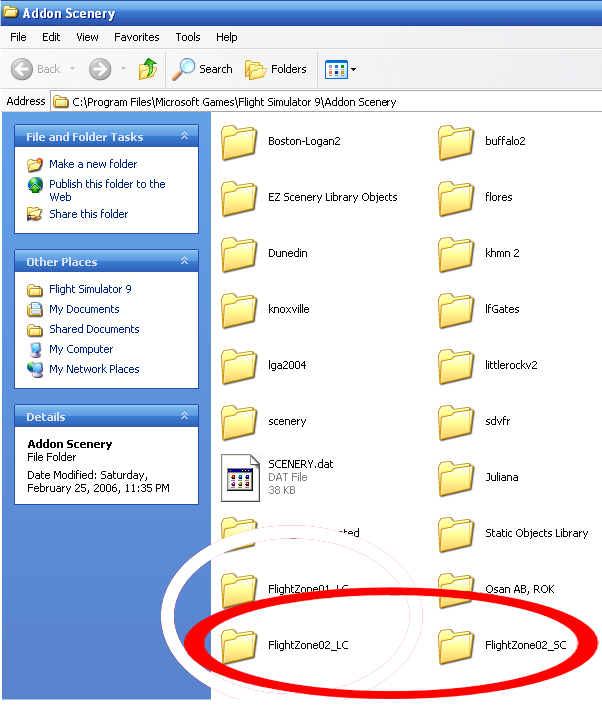
• FlightZone_02_LC
• FlightZone_02_SC
The first one (LC) is the land class files. If everything else installed ok then you don’t have to worry about this one. The other folder is the scenery (SC) folder. This is where the offending AFCAD file is.
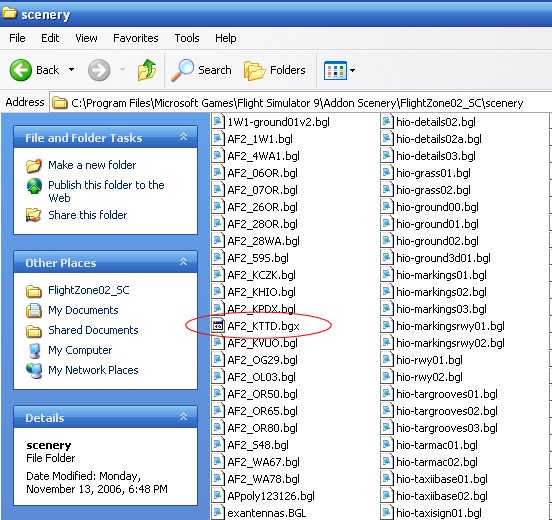
With the default install the folder path looks like this (see images below):
C:\Program Files\Microsoft Games\Flight Simulator 9\Addon Scenery\FlightZone02_SC
When you find AF2_KTTD.bgl, right click on the icon and select “rename” from the menu. All you have to do to “deactivate” this file without deleting it (in case you wish to restore it later for some reason) is to change one letter in the suffix (the three letters after the period). So change bgl to something like bgx. And click away from the box. When a dialog box opens and asks are you sure you want to do this click “yes”.
Now take the AFCAD file that I have created and place it into the FS9/Addon Scenery/Scenery folder. (You will see other bgl files there and even some AFCADs if you have installed other airport scenery stuff). That should be it.
Start up the sim and you should see a box that says it is updating the database to accept the new AFCAD. Your AI should now land and taxi to parking like it is supposed to.
Just a warning about KTTD. If there is too much traffic coming and going the ATC does not do a very good job of directing traffic and some aircraft that is stuck in position will disappear after waiting around for about five minutes anyway, but at least they land and taxi off the runway.
Enjoy the ride!
-